
TABLE OF CONTENTS
- What does the Document Reader do?
- Video showing the Document Reader workflow and Unwrap feature
- What documents can be used with the Document Reader?
- Requirement Type: Certified Trust Deed & Self-managed Super Fund Deed
- Requirement Type: Amendment Deed
- How to configure Auto Read within Settings
- Beneficiaries
- Further Questions?
What does the Document Reader do?
- This is a tool that extracts and retrieves textual information from a given source (e.g. documents, images) using artificial intelligence (AI) technology. The maximum size is 160 pages.
- It will identify all beneficial owners and persons of significant control within the Trust e.g. settlors, trustees, appointors etc.
- This enables compliance teams to complete trust due diligence within minutes, with 90% faster data and beneficial owner identification.
- Once the trust’s beneficial owners have been identified, the trust’s ownership structure will be constructed for you based on the extracted data. You can preview this in the extra side bar tab before unwrapping.
Please note there is a billable charge for each assist verification. Please contact help@firstaml.com for further information on costings.
How to use the Document Reader
- The Document Reader function is available once a Document is received by the platform, either by upload or submission through the secure web form via the Specific Document requirement.
- Click the ‘Extract’ icon. You will see two purple buttons asking whether you would like to extract details from the document, or preview the extract. See below video.
- The extraction process will take approximately 60 seconds or less. Once extracted, click ‘Preview’ to view the extracted document details.
- The ‘Extract’ feature will extract, highlight and provide the page number for the following fields: Example Trust Deed Document
- Trustees
- Settlors
- Settlement Sum
- Appointors
- Beneficiaries
- Protectors
- Guardians
- Nominees
(For Certified Trust Deed documents this will include certification detected and date of certification)
- The ‘Extract’ feature will extract, highlight and provide the page number for the following fields: Example Trust Deed Document
- If you want to edit or review any details, click the ‘Edit’ button. This will allow you to amend any details and add types to the various beneficial owners. This will also update the unwrap preview.
- If everything looks correct, you can go ahead and click ‘Unwrap’. This will build the ownership structure based on the extracted fields within the ‘Structure’ tab.
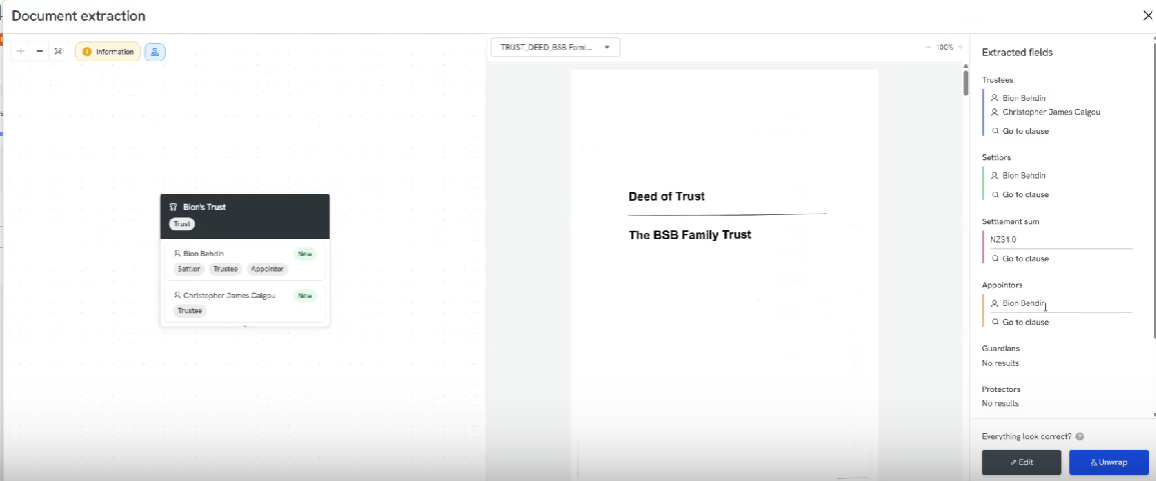
Video showing the Document Reader workflow and Unwrap feature
Please note: Unwrap goes until the first layer, not secondary companies involved. Ex. Trustee companies will need to be unwrapped separately.
What documents can be used with the Document Reader?
The document reader can extract information from a range of document types that contain trust details.
The most common document used is a Trust Deed, typically provided as a PDF. However, Assist can also process other documents that clearly outline trust information.
Examples of supported documents include:
Trust Deeds (including certified)
Amendment Deeds
Self Managed Super Funds (SMSF)
Letters confirming trust details
Certified copies of trust documents
Handwritten letters or documents containing trust information
Documents do not need to be searchable PDFs. Assist uses AI to read and extract information directly from the document, even if text search (Ctrl + F) is not available.
Handwritten content can also be processed. Extraction accuracy will depend on the legibility of the handwriting, but the system is able to successfully extract many handwritten certification sections and similar content.
For best results, ensure the document:
Clearly shows the relevant trust details
Is legible and unobstructed
Is within the 160 page maximum file size
Requirement Type: Certified Trust Deed & Self-managed Super Fund Deed
- Requirement type "Certified Trust Deed" and "SMSF Deed" will have all the same extraction functionality as the "Trust Deed" requirement
- We have an extra feature for "Certified Trust Deed" that confirms a certification is detected, the date of certification, and name of certifier (if present)
- Acceptance Criteria: Invalid or missing certification is clearly flagged
Requirement Type: Amendment Deed
- Requirement type "Amendment Deed" will have all the same extraction functionality as the "Trust Deed" requirement.
- Missing Amendment Alerts
- Roles can be added/removed via the amendments or manually
How to configure Auto Read within Settings
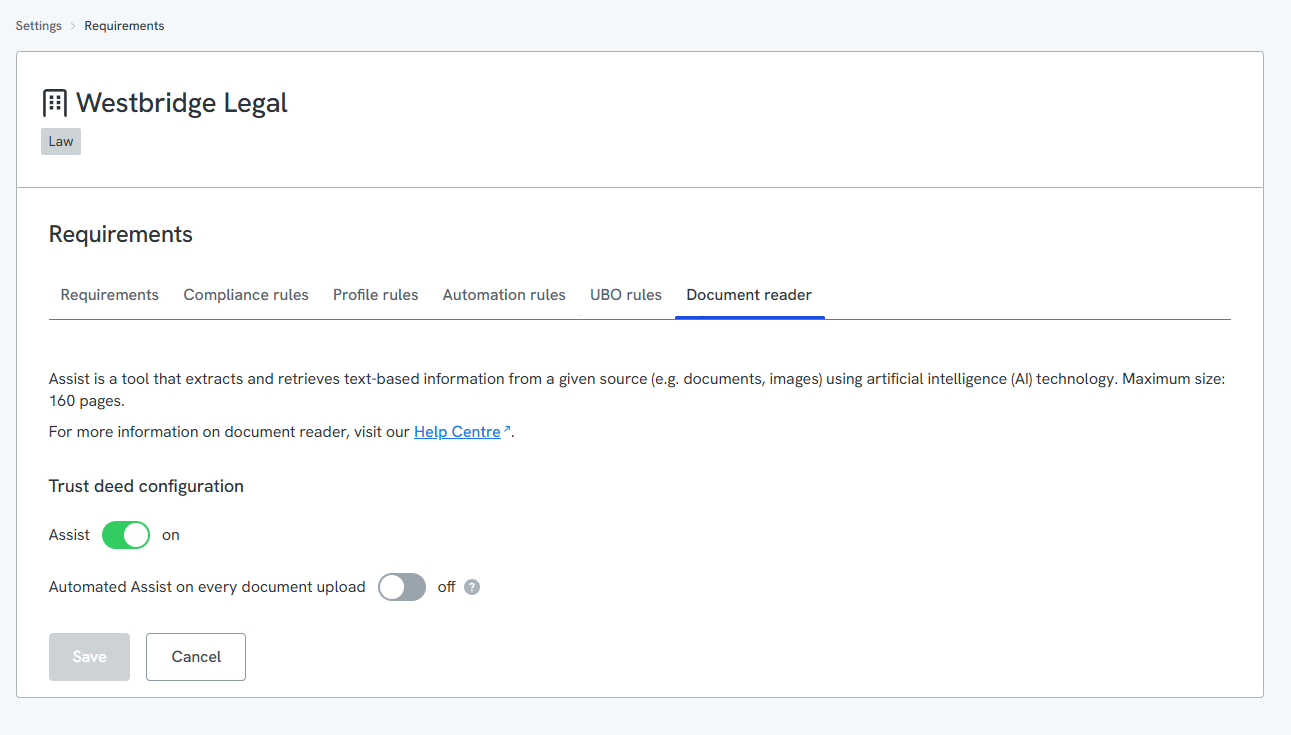
- Navigate to 'Settings' --> 'Document Reader'
- Assist is toggled on as a default. To enable automated data extraction for every document, toggle on 'Automated Assist on every document upload.' Please see the screenshot below for more information.
Beneficiaries
Please note that Beneficiaries will not be unwrapped when they are referred to in a general manner such as "the children and grandchildren of the trustees..". We point to this clause, but are unable to unwrap these as individuals.
Further Questions?
Questions regarding legal terms, privacy and data security? Please refer to our FAQs and our Legal page.