
TABLE OF CONTENTS
Summary
We understand that there may be instances where you have created a case but no longer wish to proceed.
How to delete a case
At this stage you do not have the ability to delete a case from your platform. If you do need to permanently delete a case you would need to raise a ticket via the help centre or email help@firstaml.com. We are happy to help you delete Test Cases set to abandon, however best practice for live cases is to abandon them with a note in the case notes as to why.
How to abandon case
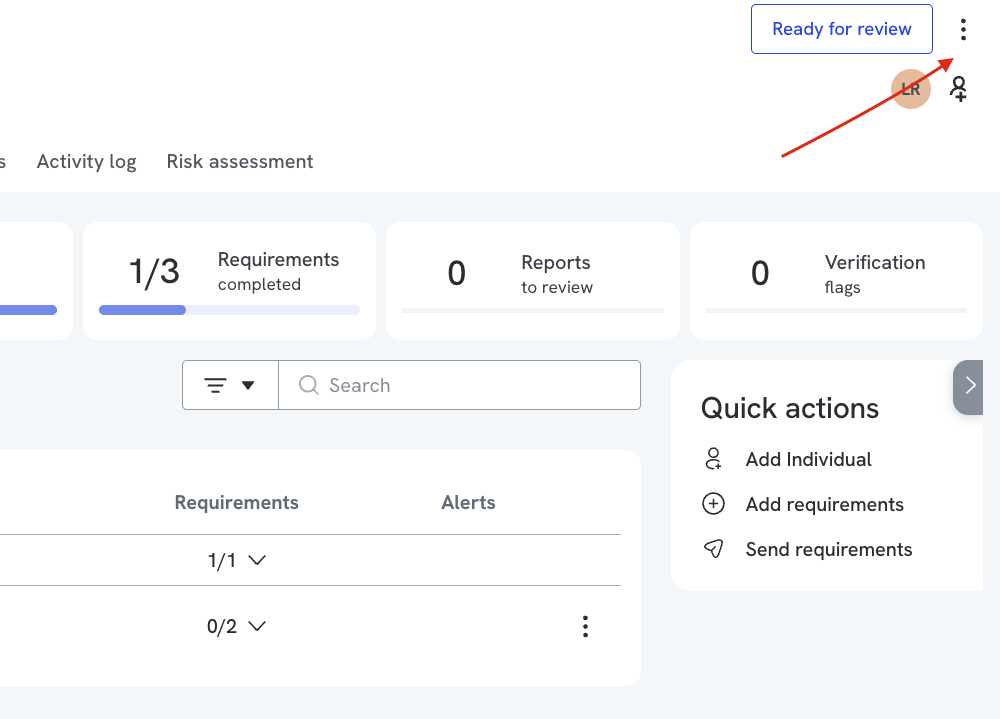
Step 1: Navigate to the "More options" menu
Within the case you wish to abandon, click on the "More options" menu (displayed as the three dots in the top right-hand corner).
Step 2: Click "Abandon case"
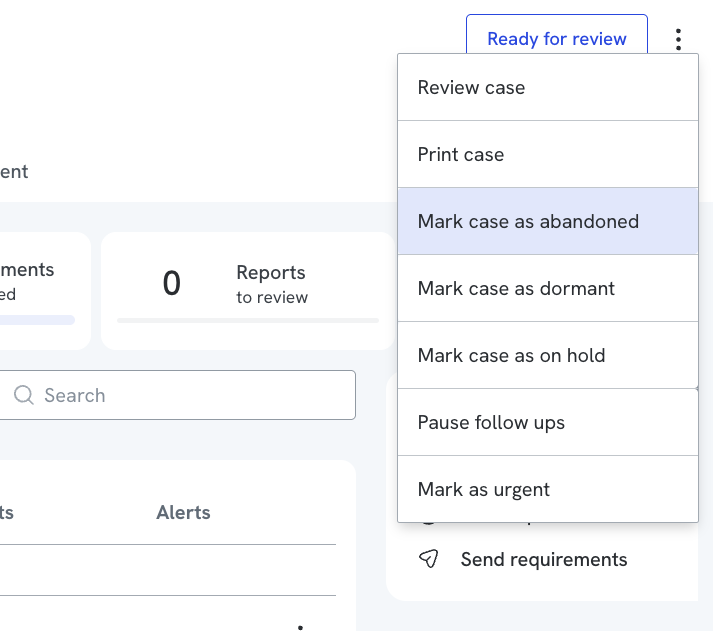
Once the "More options" menu is open, click "Abandon case" and the case will change to 'Abandoned' status and no longer appear on your Homepage.
Steps to Abandon a “Draft Case”
Note: You must have a Compliance role to perform this action.
1. Go to Draft Cases and open the relevant draft.
2. Complete all required fields (marked with *) and click “Go to Case”
3. Click the three dots (⋮) in the top-right corner.
4. Select Mark Case as Abandoned and click Yes to confirm.
Note: Only a compliance role could abandon a case