
TABLE OF CONTENTS
- How it works
- Create an automation for credit check
- What is in the company credit check?
- Scores & limits
- Core Business Data
- Payment Data
- Where does the data come from?
- What countries can company credit checks be run in?
- Is this available for all customers?
- What type of entities are we able to submit credit check requests for?
- International credit report FAQS (by international creditsafe means non-UK)
Summary
Company credit checks are a feature we are introducing into our entity verification offering. This will allow customers to develop a more complete financial and credit view of their clients, beyond the information provided by company registers.
Within the company credit checks it is deeper information regarding a company, including their creditworthiness, historical and current credit scores, historical company information, company financial position, P&L and balance sheet information (where available) alongside other financial metrics.
We’ve partnered with Creditsafe/Creditorwatch to allow our customers to pull more detailed information on their clients via Creditsafe/Creditorwatch company credit report. This information can be used as part of a credit decision process by lenders (Financial Institutions that lend money) or when our customers want to build a more detailed view of the financial position of their clients.
Please note there is a billable charge for each report. The cost varies depending on the entity's jurisdiction. Please contact help@firstaml.com for further information on costings.
What's in a company credit check
A business credit report has three parts: Scores & Limits, Core Business Data, and Payment Data.
How it works
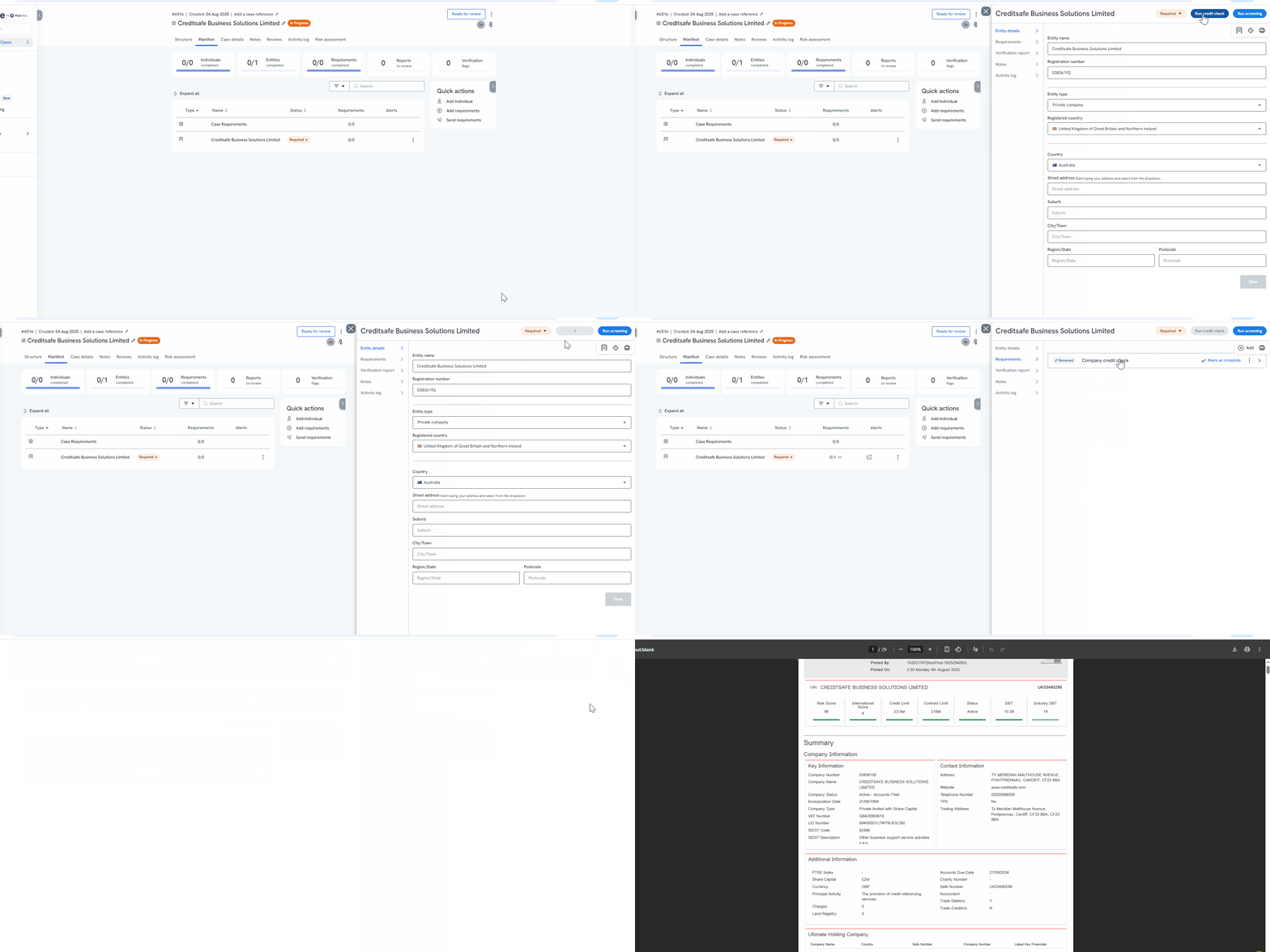
Manually requesting the credit check
- Create an entity case for a private company in the platform. Refer to our entity case creation article for step-by-step instructions.
- Click the ‘Start unwrap’ button to obtain the company registry number or if you have entered the company number during the case creation process proceed to Step 3. The company number is a mandatory field if a user wishes to run company credit checks.
- Navigate to the Manifest and click on the relevant entity you wish to run the credit check on. This will open a slide-out to the right, click on the ‘Run credit check' button at the top right-hand corner. The ‘Run credit check’ button will be disabled (greyed out) if there is no company registry number.
- The company credit check will be generated under ‘Requirements’ for review. The report will take <20 seconds to be generated.
Create an automation for credit check
You can automate the company credit check to run as soon as a case is submitted.
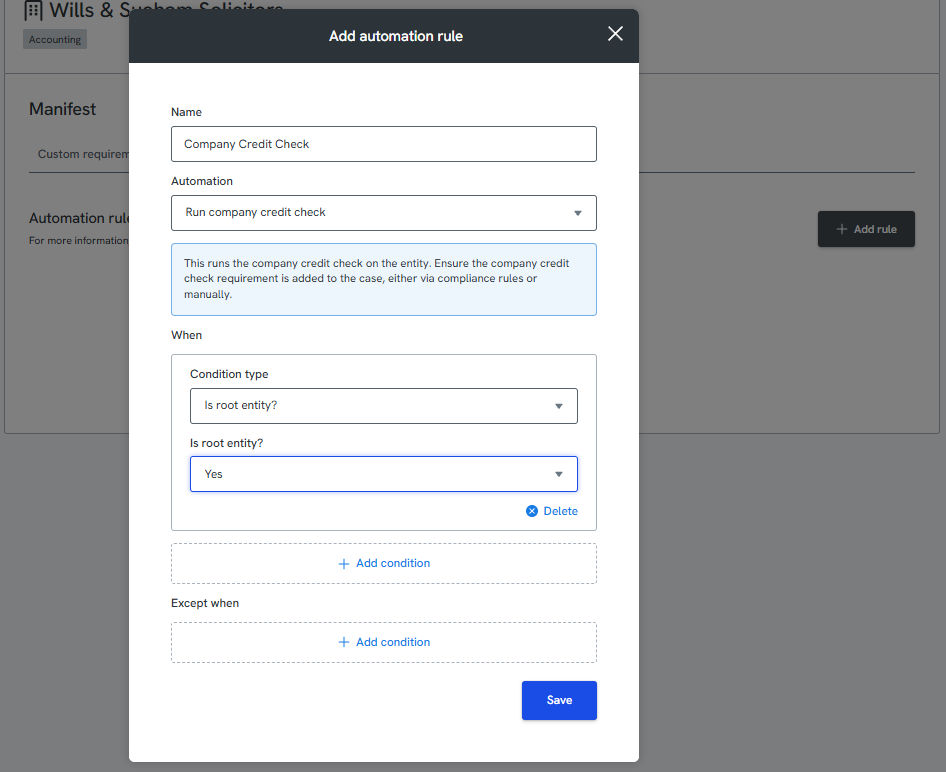
Step 1: Set up the Automation Rule
Navigate to Manifest settings in the Source platform and create an automation rule for the company credit check. This will ensure the check is triggered automatically after case submission.
Step 2: Add the Compliance Rule
Create or update a compliance rule that applies the credit check requirement to the relevant cases. This tells the platform which cases should have the check run.
Step 3: Submit Accurate Company Details
For the automation to work correctly, the following information must be entered at case creation:
Company name
Country
Company registration number
If any of these fields are missing or incorrect, the credit check may not run automatically.
What is in the company credit check?
The data within a business credit report generally fits into three areas:
- Scores & Limits
- Core Business Data
- Payment Data
Scores & Limits
The Creditsafe/Creditorwatch scoring system is designed to help you assess a company's financial stability quickly and accurately. It uses statistical techniques and key metrics to predict around 70% of company insolvencies up to 12 months in advance. Scores are colour-coded by risk: green for low risk, red for high risk.
Core Business Data
This section covers company background that can signal future risk, such as changes in the executive team or a rise in liens against the company.
Payment Data
Trade payment history is the strongest predictor of a company's future payment behaviour. A company that has fallen behind on invoices before is more likely to do so again. Creditsafe/Creditorwatch reports include trade data drawn from millions of payment records.
Where does the data come from?
Scores and limits are built from official sources, such as government entities and court systems, alongside a global network of data partners. Trade payment data comes from Creditsafe/Creditorwatch's trusted payment data suppliers, to give the most accurate picture of a company's financial stability.
What countries can company credit checks be run in?
We can provide access to 199 countries, so reports can be run on clients based anywhere in the world! Please reach out to your First AML contact who can provide additional information on data coverage.
Is this available for all customers?
Yes, the company credit checks are available for all First AML customers globally, regardless of where you are located
What type of entities are we able to submit credit check requests for?
- Private company
- Public company
- Limited liability partnership
- Limited partner
- Cooperative
- General partner
- Joint ventures
- Partnership
- Sole trader
- Unlisted public company
It is important to ensure these entities are registered and you are submitting a registration/company number to run the credit check with.
International credit report FAQs
These answer common questions about reports outside the UK.
- What does an international report include as standard? Most of what you'd expect from a local report, but not every country has an equivalent to the UK's Companies House. Where needed, information is gathered from other local sources, so contents can vary by country.
- Where does the data come from? Over 9,000 sources. Where possible, data comes from official registries similar to Companies House. Our supplier also has a network of 23 offices and local partners to collect information directly, keeping it current.
- Why can't I find a particular company? The database is live, so it isn't always possible to keep every business up to date. If you can't find a company, contact First AML Support and we'll investigate.
- How long does a report take? 99.9% of reports are delivered instantly online.
- How often are reports updated? In real time, over 1 million times a day.
- Why are scores banded A to E instead of 1 to 100? Not every country uses a 1–100 score, so an A–E band makes it easier to compare risk across countries. A is lowest risk, D is highest risk, and E means unscored.
- Why do some companies not have a score? Usually because local suppliers hold insufficient information to calculate one reliably. Other reasons include a late-filed financial statement, an active insolvency process, or the company being inactive or dissolved. A score is provided wherever possible.
- Why is financial information missing from some reports? Filing laws vary by country, and not every country requires companies to file accounts. Financials are included wherever they're accessible.
- Are searches anonymous? Yes. Business searches don't leave a footprint.
- Is director information available for every country? Not always. Millions of directors are on file, but local data privacy regulations sometimes restrict what can be shared.
- Why do some reports lack payment information? Around 60% of reports include supplier payment information. Because it's collected directly from suppliers, it isn't available for every business.