
Overview
Our new Disbursements feature helps you pass on the actual cost of AML checks to your clients. It tracks AML unit usage and surfaces a disbursement value directly inside the First AML platform and via our public API.
How Disbursements work in First AML
Checks that are run within First AML typically use “units”. The number of units used will vary based on the type of check performed.
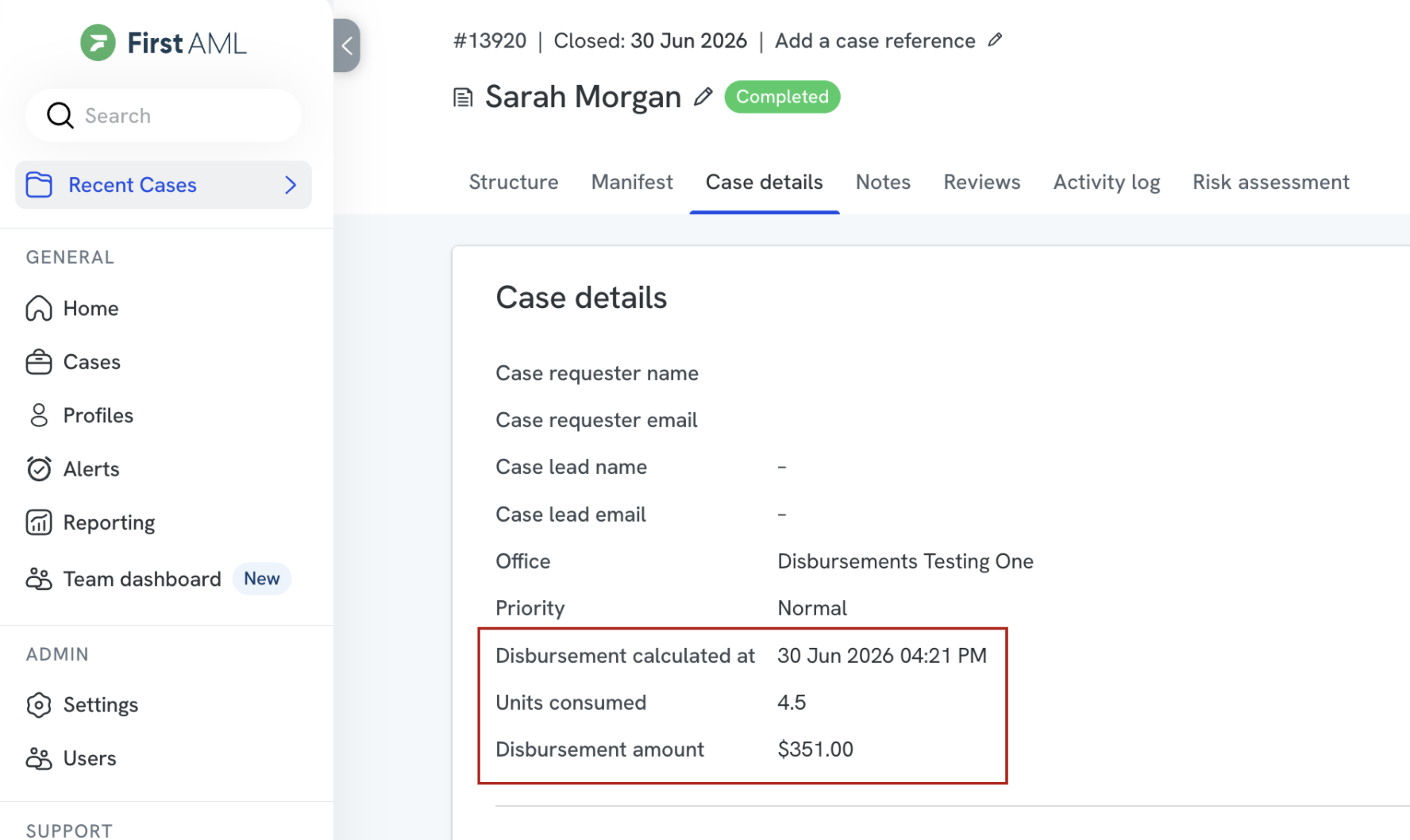
If the Disbursements feature is enabled, within the Case Details tab for each case, you will see:
- The total number of units a case has used to date.
- The “Disbursement amount” associated with these units, calculated based on your Disbursement settings.
- The time and date when disbursement information was last updated (this can take up to 90 minutes after checks are run).
Prerequisites
To set up disbursements, you will need:
- To be a First AML Compliance Admin
- To understand your First AML contract and pricing.
Understanding contracts
Before starting, you should have an understanding of your First AML Contract and what your actual costs are, so that you know how to accurately configure your disbursements.
Depending on your contract, some of the following may apply to you:
(Please note the following prices are examples and don’t reflect real world pricing).
| “Included” Units | Any units that are included as part of your overall Platform Fee (i.e. 5000 units at $0 per unit). |
| “Fixed” Units | An allocation of units which are charged at a fixed rate (i.e. 5000 units at $100 per unit). |
“Variable” Units | Variable units include:
|
| Platform Fee | Annual cost of using the First AML platform. Typically not suitable for disbursement unless your platform fee incorporates “included units”. |
| Implementation Fee | One off cost to onboard onto the First AML platform. Not suitable for disbursement. |
How to set up Disbursements in First AML
Configuration
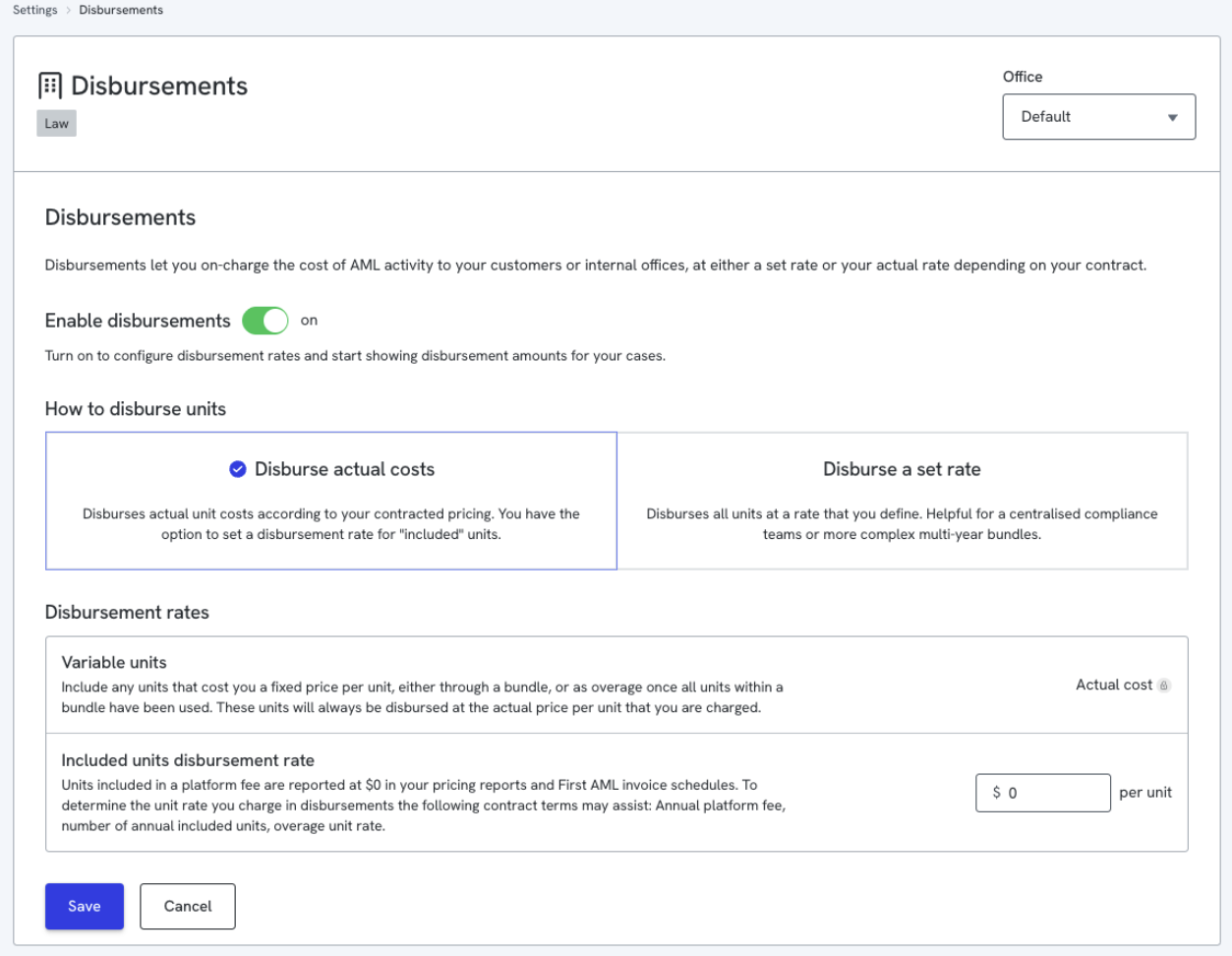
When enabling Disbursements, you will see two main options for how to disburse units:
1. Disburse actual costs
This is the default option appropriate for nearly all scenarios. How this option calculates disbursements:
| Fixed and Variable units | Disbursement calculations will ensure any Fixed or Variable units used within a case are automatically disbursed at their actual cost, in line with your current contract. Because of this, the disbursement rate for these units shows “Actual cost” and cannot be edited. |
| Included units | Disbursement calculations will default to disbursing Included units at their actual cost ($0). However, you can define a disbursement rate for included units manually, to reflect the effective per unit cost that you incur. Please note: Pricing reports and First AML invoice schedules will continue to reflect the actual cost of Included units as $0, regardless of the disbursement value you set here. |
| Platform & Implementation Fees | Disbursements calculations will not include these fees. |
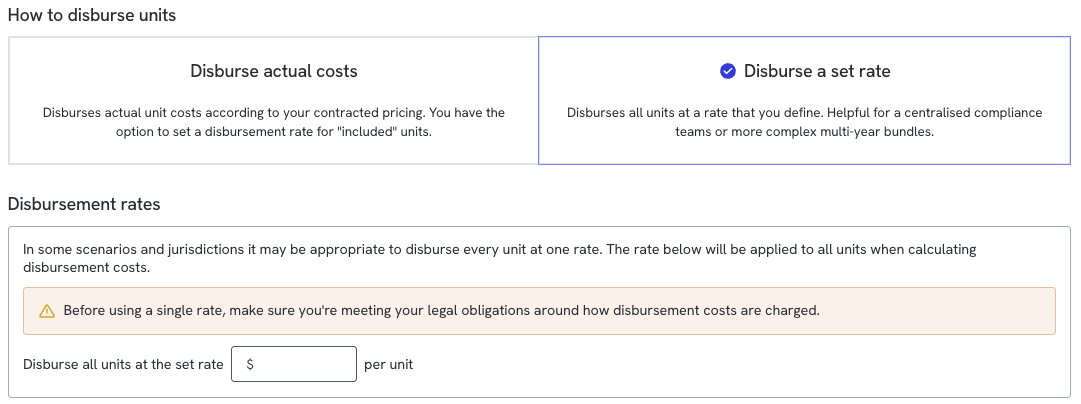
2. Disburse a set rate
This option may be appropriate, depending on the legislation in your jurisdiction and industry.
Here, you can define a set rate which will be applied to all units.
How this option calculates disbursements:
| Fixed and Variable units | Disbursement calculations will always use the set rate you define. |
| Included units | Disbursement calculations will always use the set rate you define. |
| Platform & Implementation Fees | Disbursements calculations will not include these fees. |
How Disbursements are presented
In Platform
If Disbursements are enabled, once a case has used units, the disbursement details will be presented within the Case details tab, and will also be included in the Print Case PDF.

Public API
Disbursements are also available via our Public API, returned as part of theCaseInformationobject.
Example Query
query caseDetails($caseId: String!) {
  caseDetails(caseId: $caseId) {
    ... on CaseInformation {
      caseId
      caseStatus
      name
      disbursement {
        amount
        calculatedAt
        totalUnits
      }
      organization {
        organizationId
        name
        offices {
          key
          name
        }
      }
    }
    ... on ValidationErrors {
      errors {
        message
        fieldPath
        __typename
      }
    }
  }
}
Example Response
{
  "data": {
    "caseDetails": {
      "caseId": "13924",
      "caseStatus": "COMPLETED",
      "disbursement": {
        "amount": 24.000000,
        "calculatedAt": "2026-06-29T02:23:02.684Z",
        "totalUnits": 2.000000
      },
      "organization": {
        "organizationId": "82d1db19cd334af1aa2dda827589d927",
        "name": "Organisation Name",
        "offices": [
          {
            "key": "0a9658595d4143bea761851fde2e2b10",
            "name": "Office Name"
          }
        ]
      }
    }
  }
}
Webhook and handling changes to Disbursements
In some scenarios, it is possible that disbursement information may change after a case has been completed. This is because there is a delay in our system's processing of billable activity.
For example, if checks are run and the case is immediately closed, disbursements will show as $0 when the case has closed, as our system has not yet been able to calculate the cost of those checks. It may take up to 90 minutes from the time checks are run for those checks to be identified by our billing system.
For this reason, we have introduced a new webhook type CaseDisbursementUpdated . This will inform you whenever a Completed case has changes to its disbursements so that you can retrieve this information.
For more information, see Webhooks in our developer documentation.
Example payload
{
"eventType": "CaseDisbursementUpdated",
"caseId": 12345,
"officeKey": "abc456789-3476-4ce6-8491-bdd1272cf01"
}
Disbursement configuration example
Your contract may be structured similar to the table below, with units “included” in your platform fee.
| Platform Fee (Annual) | $500,000 |
| Implementation Fee (one off) | $15,000 |
| Included units | 5,000 units @ $0 per unit |
| Variable units (Overage) | $90 per unit |
In this scenario, you may decide to:
- Ignore your implementation fee.
- Divide your included units by your platform fee to identify an approximate per unit cost of $100 per unit for the first 5,000 units.
- Identify your overage unit rate of $90 per unit.
- Choose to select the “Disburse actual costs” option, and apply an “included unit” disbursement rate of $90 per unit to disburse costs consistently across all your units.
Frequently Asked Questions
Q: Who can view disbursement values on a day-to-day basis?
- Disbursement information is visible to anyone who can view the case.
Q: When do automated billing webhooks trigger?
- Webhooks only fire for completed cases. This ensures that your external practice management systems do not receive "noise" or fluctuating figures from intermediate recalculations while a case is still actively open.
Q: What happens if a completed case's cost tier changes later in the month?
- If a tiered billing adjustment shifts a completed case's profile later in the month (e.g., a case is marked non-billable, changing your volume scale), the system automatically recalculates the value. A new webhook event will fire to update your records with the corrected final amount.