
TABLE OF CONTENTS
- What gets automatically marked
- What is never automatically marked
- Individuals/Entities that still need your judgement
- How trusts are handled
- Managing Auto-mark Not Needed
- Reviewing and overriding automatic marks
- Frequently asked questions
- Why hasn't anything been marked on my case, even though auto-marking is on?
- I have two UBO rules with different thresholds. Which one decides what gets marked?
- How can I tell whether an individual/entity was marked by the system or by a person?
- Will turning on auto-marking change individuals/entities on my existing cases?
- The system marked someone I think we need to verify. Can I change it?
Auto-mark Not Needed automatically marks individuals and entities as Not Needed during structure unwrapping, when they are determined not to require verification. This helps your team focus on the individuals and entities that matter. The system only marks an individual or entity as Not Needed when it can determine they cannot be a beneficial owner. Anyone who might still qualify is left for review.
Note: This feature is on by default, Compliance Admin can turns it off for your organisation. For what the Not Needed status means and how to set it yourself, see Understanding individual and entity status.
What gets automatically marked
Auto-marking works off each individual's and entity’s relationship to the root entity, the company the case is about. It considers total ownership, control or voting rights across all ownership paths to the root entity, as well as whether the entity holds a key role.
An individual or entity is only marked as Not Needed when the system determines they can never reach either threshold, regardless of how much more of the structure is unwrapped. If there is still any possibility they could reach a threshold based on ownership or control that has not yet been revealed, they remain unmarked. Otherwise, they are marked as Not Needed.
For example, a shareholder sitting at 24% with 2% of the structure still unallocated could still exceed a 25% threshold once more is unwrapped, so they remain unmarked. A shareholder at 5% with nothing left to allocate cannot reach a threshold, so they are marked as Not Needed.
What is never automatically marked
Some individuals/entities are always left for you to review, however small their shareholding, because their role or position may mean you should still verify them regardless of ownership percentage. The system never auto-marks:
- Directors of the root entity and Acting on Behalf, whether they are people or companies.
- Persons of Significant Control of the root entity.
- Anyone who meets or exceeds the ownership or control threshold defined in your rule set.
- The Ultimate Holding Company of the structure, and the people on it.
- Trusts that require special handling (see Trusts below).
Individuals/Entities that still need your judgement
While a structure is still being unwrapped, the system does not automatically mark any individual who could still turn out to be a beneficial owner, or any entity that could still lead to one.
Individuals who could still reach the ownership or control threshold are tagged as Potential UBO. Entities that could still reveal a beneficial owner when unwrapped are also left unmarked, although they do not receive the Potential UBO tag.
The system does not mark any of these as Not Needed. They indicate that more unwrapping is required before the beneficial owners can be determined. If you see a Potential UBO or an unmarked entity, continue unwrapping the structure until no further ownership information can be found.
How trusts are handled
Trusts are treated differently because they break the chain of ownership. An above-threshold trust is never automatically marked, its trustees are shown, and nothing beneath it is automatically marked as Not Needed. A below-threshold trust can be marked as Not Needed, along with its trustees, just like any other below-threshold individual or entity.
When auto-marking pauses for the whole case
Auto-marking pauses across the entire case if there is an above-threshold trust with a trustee company that hasn't been unwrapped yet. The system does this because unwrapping the trustee company may reveal individuals who are already part of the ownership structure or introduce new ones. Until that information is available, it can't safely determine who should be marked as required or not required.
Note: If auto-marking is enabled but no one has been marked, check whether there is a trustee company on an above-threshold trust that still needs to be unwrapped.
Managing Auto-mark Not Needed
Auto-marking is enabled by default and is managed through a global setting. When enabled, it applies to all cases in your organisation until it is turned off.
To change this setting:
- Go to Settings > UBO rules
- Find the "Not Needed" automation setting.
- Turn Automatically mark individuals and entities as "Not Needed" when they are below threshold and have no key role on or off as required.
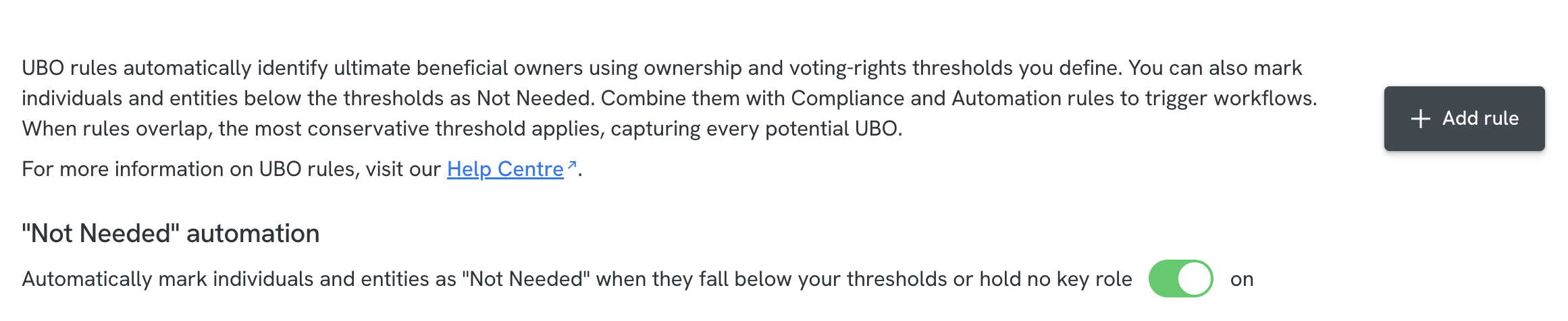
While enabled, the automation marks eligible individuals and entities as "Not Needed" whenever the structure on a case is updated.
Thresholds are defined in your UBO rules. If multiple rules apply, the system uses the most conservative thresholds to ensure no potential beneficial owner is missed. Enabling auto-marking does not change your thresholds; it only applies them.
Auto-marking is also required for sending secure web forms automatically. On cases with entities, the Send secure web form automation waits until the platform knows who is and is not required. If auto-marking is off, or your UBO thresholds are not set, the form is never sent. See Automatically sending secure web forms.
Reviewing and overriding automatic marks
Auto-marking suggests an initial status that can be changed during review. If an individual or entity marked as Not Needed should be verified, you can update its status from the Manifest. Status changes are made in the Manifest, not directly on the Structure graph.
To do this:
- Go to the Manifest for the case.
- Find the individual or entity you want to update.
- Click the current Status
- Select the appropriate status in the dropdown menu (for example, Required)
If you are viewing the Structure graph, click the individual or entity you want to update, then open the Manifest to make the update.
Frequently asked questions
Why hasn't anything been marked on my case, even though auto-marking is on?
Usually this means the structure has not been fully unwrapped yet. While there is still ownership or control that has not been revealed, some individuals or entities that could still become beneficial owners remain unmarked.
In some cases involving trusts, auto-marking may pause across the case until the trustee company is unwrapped. Once unwrapped, marking resumes automatically.
See How trusts are handled.
I have two UBO rules with different thresholds. Which one decides what gets marked?
The rule with the lowest ownership threshold always governs marking, so the system never marks someone a stricter rule would exclude. If multiple UBO rules apply, enabling a higher-threshold rule does not override a lower one. See When you have more than one UBO rule.
How can I tell whether an individual/entity was marked by the system or by a person?
You can check the Activity Log to see whether a status change was made by the system or by a user. The node itself does not show this information. See Understanding activity logs
Will turning on auto-marking change individuals/entities on my existing cases?
No. Auto-marking only applies when a case is updated, such as during an unwrap or a manual edit.
The system marked someone I think we need to verify. Can I change it?
Yes. You can change any system-marked status from the Manifest. System marks are not locked and can always be overridden during review.